Should You Upgrade from Obsbot Tiny 3 to Insta360 Link 2 Webcam?
Introduction
For many who work, teach, stream, or create from home, the webcam is no longer an afterthought — it shapes presence, clarity, and how others perceive professionalism. Two devices that often come up in upgrade conversations are the Obsbot Tiny 3 and the Insta360 Link 2. Both promise smarter framing, cleaner video, and features beyond a basic laptop camera, but they approach the problem differently. This article helps buyers determine whether upgrading from an Obsbot Tiny 3 to an Insta360 Link 2 makes sense, by comparing real-world use cases, assessing strengths and weaknesses, and offering practical buying guidance.
Quick product overviews
Obsbot Tiny 3 — what it's designed for
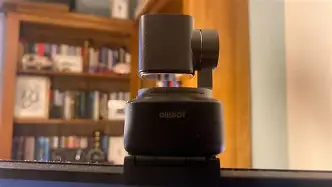
The Obsbot Tiny 3 positions itself as a compact, AI-driven PTZ (pan, tilt, zoom) webcam focused on automatic subject tracking and hands-free framing. It appeals to people who frequently move while on camera — tutors who walk to a whiteboard, presenters who gesture widely, or live streamers who want a single-cam solution that follows action without manual input. Its small footprint and plug-and-play make it attractive for desk setups where space is at a premium.
Insta360 Link 2 — what it's designed for
The Insta360 Link 2 builds on the idea of an intelligent webcam but leans into higher-end imaging and smoother mechanical stabilization. It typically targets professionals who prioritize image quality and cinematic motion for product demos, premium streaming, or recorded video content. The Link 2 often includes advanced gimbal-style stabilization and a larger sensor package, placing it closer to a hybrid webcam/compact camera in terms of visual output.
Detailed analysis: key areas buyers care about
Image quality and sensor performance
Image quality is the first place most people notice a difference. The Obsbot Tiny 3 is optimized for reliable face-tracking and decent clarity in well-lit rooms. It generally delivers crisp colors and a usable dynamic range for video calls. The Insta360 Link 2 tends to emphasize a larger sensor and optics designed to retain fine detail, better color depth, and improved handling of highlights and shadows. In practical terms, this means recorded videos or livestreams from the Link 2 can look more “filmic” and more flattering in mixed lighting.

Tracking and motion handling
Both devices aim to solve the same problem — how to keep a moving person framed — but they do it differently. Obsbot products historically favor AI-based tracking with responsive pan/tilt motors and software that prioritizes subject centering. That approach is lightweight and usually lower-latency, which is beneficial for live interactions where the camera must react instantly.
Insta360’s Link 2 often incorporates a mechanical stabilization approach (gimbal-style) combined with AI framing, which can produce smoother camera moves and more natural transitions when the user walks or turns. The trade-off is sometimes slightly more deliberate motion to preserve smoothness rather than snap-to-center immediacy. For broadcast-style presentations or recorded content where cinematic motion is preferred, the Link 2’s behavior is often better. For real-time teaching where instant framing is critical, Obsbot’s responsiveness can be advantageous.
Audio and microphone quality
Both webcams include integrated microphone arrays, but built-in mics remain a compromise compared with standalone microphones. The Obsbot Tiny 3 typically offers a competent array for casual meetings and quick recordings, with reasonable pickup for a single speaker in a small room. The Link 2 emphasizes clear capture as well but — in real-world setups — neither device replaces a dedicated USB/XLR mic or lavalier for podcasting, voiceover, or professional streaming.
Software features and ecosystem
Software matters as much as hardware because it defines how tracking, noise reduction, background effects, and updates are managed. Obsbot’s companion software is often straightforward, exposing tracking sensitivity, framing presets, and gesture controls. Insta360’s software ecosystem tends to expand beyond webcam control: it can include AI background removal, portrait modes, and post-capture tools that integrate with other Insta360 accessories. Buyers should assess compatibility with their OS (Windows / macOS) and whether the vendor provides regular firmware updates.
Shop the latest Laptops & Computers picks on Amazon.
View Offers →Build, mounting, and privacy
Build quality and mounting options affect day-to-day convenience. The Tiny 3’s compact design is easy to clamp onto a laptop or monitor and store away. Link 2 units often have a larger footprint but may offer more robust build materials and a heavier base for stability. Privacy features like physical shutters or easy-to-activate software privacy modes are important; buyers should confirm whether a shutter is included or if a compatible third-party physical cover will be necessary.
Latency, streaming, and workflow integration
For live streaming and low-latency collaboration, the raw performance matters. Both devices offer UVC compatibility for plug-and-play use with meeting apps and streaming software, but latency and CPU usage can vary particularly when software-based effects are enabled. Streamers should check whether the webcam supports hardware encoding or works well with OBS Studio, Streamlabs, and common conferencing tools. Obsbot’s lighter tracking algorithms can result in slightly lower CPU overhead in some setups, while the Link 2’s advanced imaging features may require more processing when enabled.
Low-light performance
If a home office has limited lighting, the webcam’s low-light handling is critical. The Link 2 generally emphasizes sensor size and lens quality, which tend to deliver better low-light results with less grain and better color retention. The Tiny 3 performs adequately in normal indoor light but may show noise more quickly in dim environments. Either camera benefits greatly from even simple lighting upgrades (key light or ring light) for consistent results.
Pros & cons
Obsbot Tiny 3
- Pros: compact and portable; responsive AI tracking; easy to set up; low footprint on desk; good for active presenters and teachers
- Cons: image quality is good but not class-leading; limited advanced imaging features; built-in mic is serviceable but not studio-grade
Insta360 Link 2
- Pros: higher-end image quality and color rendering; smoother mechanical stabilization and cinematic motion; richer software features; better low-light headroom
- Cons: larger physical profile; potentially higher CPU impact when advanced features enabled; typically higher price point
Side-by-side comparison
| Obsbot Tiny 3 | Insta360 Link 2 | |
|---|---|---|
| Primary strength | Responsive AI tracking for presenters | Image quality and smooth gimbal-style motion |
| Typical resolution | Up to high-definition / 4K variants exist depending on model and settings | Focus on higher-resolution capture with enhanced color/low-light handling |
| Tracking tech | AI pan/tilt tracking (fast responsiveness) | AI framing + mechanical stabilization (smoother motion) |
| Field of view | Moderate, optimized for single-person framing | Often wider or adjustable, better for framing and cinematic shots |
| Microphone | Built-in array — good for meetings | Built-in array — good, but still not a replacement for a dedicated mic |
| Software features | Tracking controls, presets, gesture controls | Framing presets, portrait/background tools, broader editing ecosystem |
| Mounting & size | Small and lightweight — easy to clamp or pack | Heavier and more substantial — stable but less pocketable |
| Best for | Teachers, presenters, casual streamers who move a lot | Professional streamers, recorded content creators, product demonstrators |
Real-world use cases — who benefits from upgrading?
Keep the Tiny 3 if...
- The primary need is responsive tracking during live, interactive sessions: tutoring, small-classroom teaching, fitness demos where the presenter moves frequently.
- The workspace is constrained and portability matters — the Tiny 3 is easier to tuck into a bag.
- Budget is a bigger concern and existing image quality is acceptable for video calls and quick streams.
Consider upgrading to the Link 2 if...
- Video work is recorded and published: recorded tutorials, high-quality livestreams, product videos where image quality and motion smoothness significantly affect perception.
- Low-light performance and color fidelity are important and the current webcam shows noise or flat colors in your lighting conditions.
- There is a desire for more cinematic motion during camera pans and turns, or for an elevated image that reduces post-production grading work.
Buying guide: what to prioritize when choosing or upgrading
When deciding whether to upgrade, use this practical checklist to evaluate how each factor maps to the buyer's needs.
1) Define the primary use
Is the webcam mainly for meetings, hybrid teaching, livestreaming, or recorded content? For meetings, responsiveness and simplicity are often enough. For recorded content or professional streaming, image quality and smoothing matter more.
2) Check compatibility and software support
Confirm that the webcam's drivers and companion app work smoothly on the intended platform (Windows and macOS versions differ). Consider how often firmware updates are released and whether the manufacturer actively supports features and bug fixes.
3) Prioritize image quality vs tracking behavior
Decide whether a snappy track-and-center behavior or a smooth, cinematic motion better matches the workflow. Fast, low-latency tracking suits live, improvised sessions. Smoother movement suits staged presentations and polished streams.
4) Measure your environment
Room size, background, and lighting influence choice. Larger rooms or multi-person framing may benefit from a wider field of view or higher optical quality. If lighting is poor, opt for better sensors or plan to invest in basic lighting.
Find top-rated Laptops & Computers products at great prices.
View Offers →5) Audio strategy
Built-in mics are convenient but rarely sufficient for content where audio quality matters. Factor in the cost and space for a dedicated microphone if audio fidelity is important.
6) Consider ergonomics and mounting
Look for a mounting system that works with your monitor or tripod. If you travel, a compact camera wins. For a permanent desktop studio, a heavier, more stable webcam may be preferable.
7) Evaluate total system cost
Upgrading to a higher-tier webcam is an investment. Consider whether the visual and workflow gains justify the price relative to other upgrades (lighting, microphone, capture card). Sometimes a modest lighting upgrade plus the existing Tiny 3 can deliver more visual improvement than swapping to a higher-end webcam.
8) Test before committing
When possible, test the camera in the intended environment. Check return policies and firmware update histories. Trialing a device alongside existing gear helps validate whether the upgrade will meet expectations.
Practical tips for a smoother transition
- Update firmware on both devices; vendors occasionally improve tracking behavior and image processing after release.
- Use manual exposure and white balance presets if the software allows — automatic modes can “hunt” in mixed lighting scenarios.
- Pair any webcam upgrade with basic lighting (a soft key light) to get the most from a higher-quality sensor.
- Use an external mic for podcasts, streams, or recorded lessons; the webcam mic is for convenience, not production-quality audio.
- If privacy is a concern and the new camera lacks a physical shutter, keep a small physical cover on hand for times when the camera should be blocked.
Conclusion
The decision to upgrade from an Obsbot Tiny 3 to an Insta360 Link 2 depends on priorities. For active presenters and teachers who need compact hardware and responsive tracking for live, interactive situations, the Tiny 3 remains a strong, practical choice. For creators whose work benefits from improved image fidelity, smoother motion, and richer software features — especially in low-light or recorded workflows — the Link 2 can represent a meaningful visual step up.
Rather than viewing the upgrade purely as a camera swap, consider the entire production chain: lighting, audio, and software integration. For many users, modest investments in lighting and audio will yield immediate, visible improvements that rival camera upgrades. When the camera itself is the limiting factor — if the Tiny 3's image quality or motion smoothness is consistently holding production back — an Insta360 Link 2 is a defensible upgrade that raises visual quality and creative flexibility.